
Telegram Notifications with Nagios
I am using a small Nagios Core server at home to monitor my systems (for example updates for NAS and Linux devices). Instead of setting up mail notifications only, I wanted to receive notifications via Telegram.
This guide shows the complete setup from bot creation to Nagios configuration.
Step 1 - Set up a Telegram bot
First, create a Telegram bot that will send your notifications.
- Open Telegram (web interface recommended).
- Search for
@BotFatherand start a conversation. - Run
/newbot. - Set a bot name (for example
Nagios notifications). - Set a username ending with
bot(for exampleNagiosNotification20191219_bot).
After creation, BotFather returns your bot API key and the bot URL.
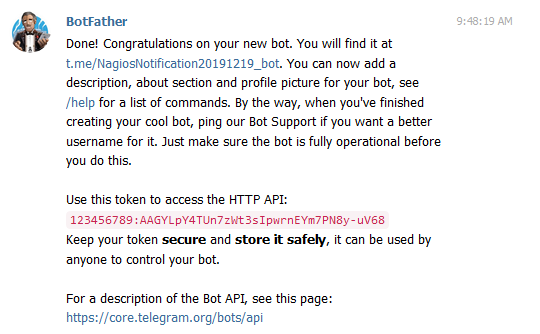
Now get your own Telegram user ID:
- Open
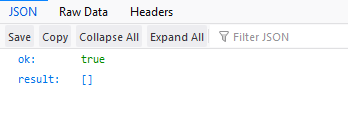
https://api.telegram.org/bot<BOTAPI-KEY>/getUpdates - Send any message to your bot (after
/start). - Refresh the page.
- Copy your Telegram user ID from the JSON response.
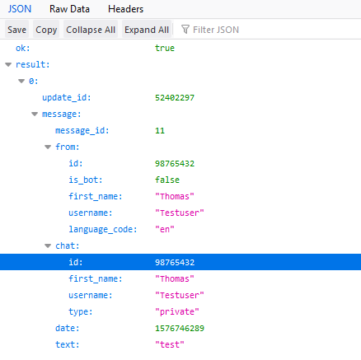
You will need this ID in the Nagios contact config.
Step 2 - Configure Nagios
Open your commands.cfg (usually in nagios/etc/objects) and add these commands.
Replace <BOTAPI-KEY> with your real key.
# 'notify-host-by-telegram' command definition
define command {
    command_name notify-host-by-telegram
    command_line /usr/bin/curl -X POST --data chat_id=$CONTACTPAGER$ --data parse_mode="markdown" --data text="%60$HOSTNAME$%60 %0A%0A$NOTIFICATIONTYPE$ %0A%60$HOSTSTATE$%60 %0A%60$HOSTADDRESS$%60 %0A%60$HOSTOUTPUT$%60" https://api.telegram.org/bot<BOTAPI-KEY>/sendMessage
}

# 'notify-service-by-telegram' command definition
define command {
    command_name notify-service-by-telegram
    command_line /usr/bin/curl -X POST --data chat_id=$CONTACTPAGER$ --data parse_mode="markdown" --data text="%60$HOSTNAME$%60 %0A%0A$NOTIFICATIONTYPE$ %0A%60$SERVICEDESC$%60 %0A%60$HOSTADDRESS$%60 %0A%60$SERVICESTATE$%60 %0A%60$SERVICEOUTPUT$%60" https://api.telegram.org/bot<BOTAPI-KEY>/sendMessage
}
Then edit contacts.cfg and use the Telegram ID in pager.
define contact {
    contact_name nagiosadmin
    use generic-contact
    alias Nagios Admin
    email root@localhost
    pager YOUR-TELEGRAM-ID-HERE
    service_notification_commands notify-service-by-telegram
    host_notification_commands notify-host-by-telegram
}
Save and restart Nagios.
Step 3 - Optional setup
Multiple notification methods
If you want Telegram and mail in parallel, use both notification commands:
service_notification_commands notify-service-by-telegram,notify-service-by-email
host_notification_commands notify-host-by-telegram,notify-host-by-email
Telegram behind a proxy
If your Nagios server is behind a proxy, add proxy settings to curl:
command_line /usr/bin/curl -x '[user:password@]proxy-address[:port]' -X POST ...
Script to validate config and optionally restart Nagios
#!/bin/bash
/usr/local/nagios/bin/nagios -v /usr/local/nagios/etc/nagios.cfg
export RC=$?

if [ "$RC" = "0" ]; then
    clear
    echo "No errors found."
    echo "Restart nagios service (y)es/(n)o"
    read restart

    if [ "$restart" = "y" ]; then
        echo "Nagios service is being restarted. Please wait..."
        systemctl stop nagios.service
        sleep 5
        killall nagios
        sleep 5
        systemctl start nagios.service
        echo "Restarted nagios service"
    else
        echo "Nagios will not be restarted"
    fi
fi
Adjust service commands depending on your OS and service manager.